Java Variables and Datatypes

Hello! all, a warm welcome to my scratchPad. If you are new to this series and wanna know more about it, as well as my resources and motivation behind it, you can read it up here in the Series Introduction.
So, without further ado, let's dive in!
Today, we are handling the foundational blocks often overlooked: Variables and Datatypes.
Textbooks call variables a "container". Sure, cool. But what happens when you tell Java to store a number? Where does it actually live? Let's look at how Java actually handles your data.
1. What even is a Variable?
Instead of calling it a "container," think of a variable as an Identifier. It is a human-readable label that the compiler binds to a typed slot—either a CPU register, a stack frame offset, or a field offset inside an object. That slot holds the actual value.
( Too technical, I am simply saying: Variable or Identifier represents an allocated memory location where this Java literal or value is stored. )
int firstVar = 29
Here, 29 is the raw literal and firstVar is the variable—the label the JVM uses to track where those 32 bits live.
Java is statically typed
Unlike Python or JavaScript, which are dynamically typed and bind types to the objects themselves rather than the variables, Java forces you to declare the type upfront. It's statically typed. The compiler must know exactly how many bits of hardware real estate to reserve before your code even runs.
Java data types are split into two major paths:
Primitive: Raw values, stored directly in place (on the stack or in registers) without any object wrapper wrapping them.
Non-Primitive: Objects and references (we'll break these down in a later post).
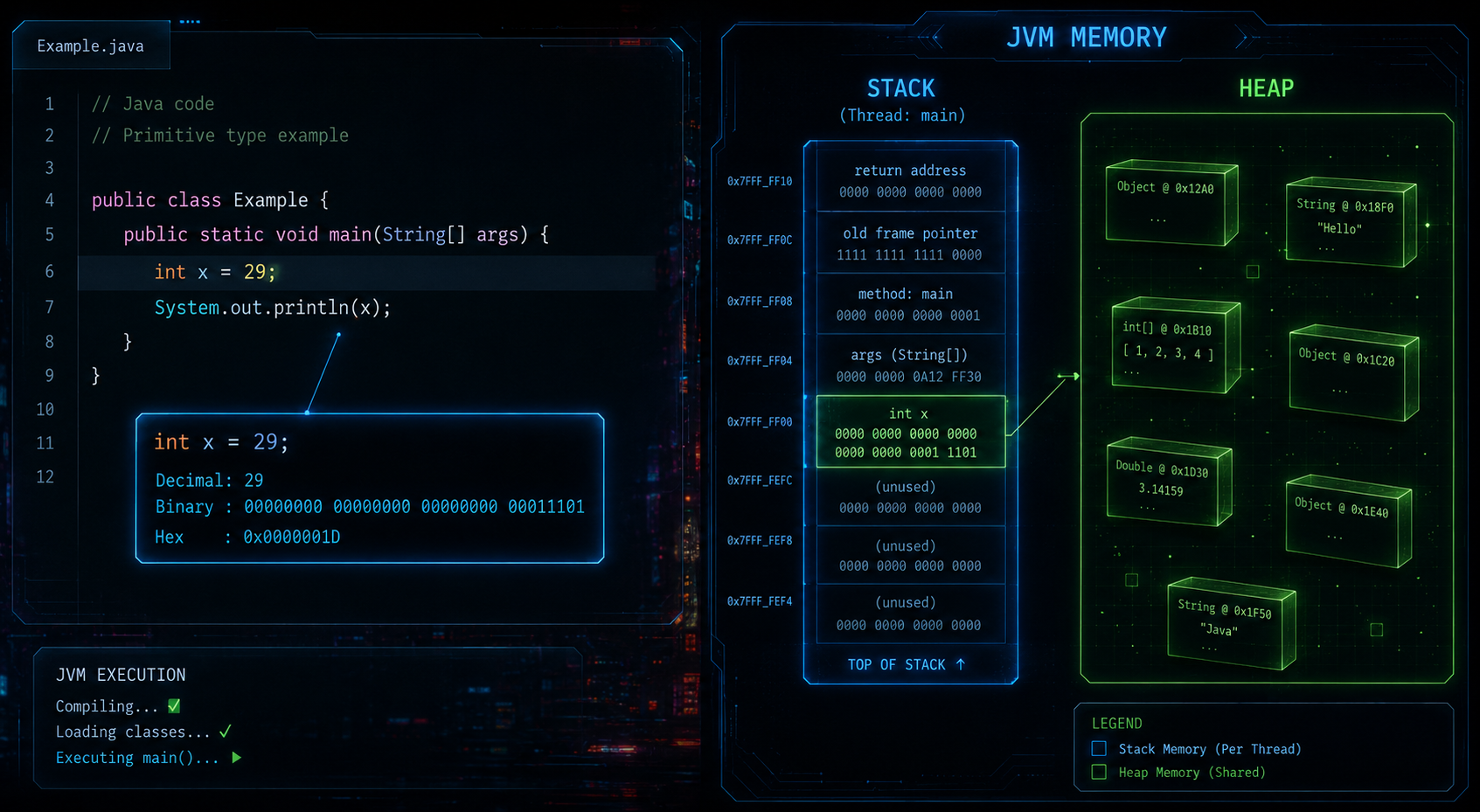
Quick Note on Memory: Stack vs. Heap
Before we dive into the types, you need to know where they live. Java splits memory into two main zones:
The Stack: Fast, temporary storage for your local primitives and method calls.
The Heap: Massive, shared storage for objects and arrays.
We're focusing on Stack-bound primitives today. We'll tackle the Heap and Objects in a dedicated deep-dive post later in this series.
I understand your frustration, you are probably wondering, Why am I skipping some deep dives, today? First about Non-Primitives, then about Memory?
Well, guys, the hard truth is, first of all, this post isn't the right place to discuss those topics in depth. Secondly, you all are not ready for those deep dives just yet, as per my content strategy. And, finally, I don't want to clutter my post like I did in the last one, even when I was reading it, it took me two days to complete it!
So, that is why, I adjusted my strategy a little bit and have decided to disperse the content better.
2. The Primitives Breakdown
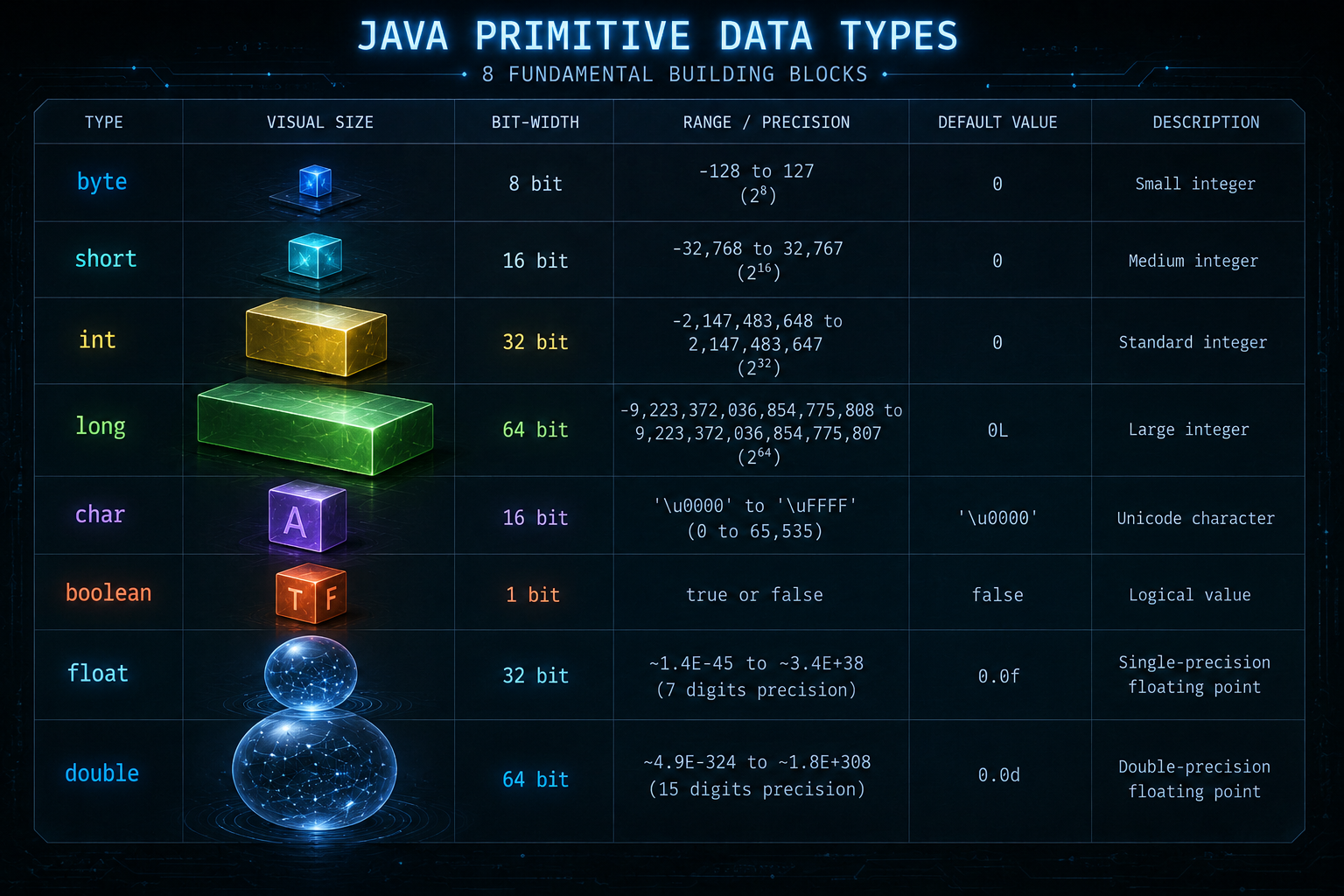
Java gives us 8 built-in primitive types to work with. Let's look at the integers and real numbers.
The Integer Group (Whole Numbers)
Java offers four distinct types for whole numbers. Crucial rule: All integer primitives except char are signed. This means they split their range right down the middle to handle both positive and negative values.
| Name | Width (Bits) | Range (Formula) | Range (Actual Values) |
|---|---|---|---|
| byte | 8 | −2⁷ to 2⁷−1 | -128 to 127 |
| short | 16 | −2¹⁵ to 2¹⁵−1 | -32,768 to 32,767 |
| int | 32 | −2³¹ to 2³¹−1 | -2,147,483,648 to 2,147,483,647 |
| long | 64 | −2⁶³ to 2⁶³−1 | -9,223,372,036,854,775,808 to 9,223,372,036,854,775,807 |
The Real Numbers (Floating Points)
When you need decimals, you use floating-point numbers.
| Name | Width (Bits) | Precision | Range |
|---|---|---|---|
| float | 32 | Single Precision | 1.4e−45 to 3.4e+038 |
| double | 64 | Double Precision | 4.9e−324 to 1.8e+308 |
float: Uses half the memory bandwidth and can offer higher throughput in SIMD/vector operations, but double is typically equally fast or faster for scalar math on modern 64-bit CPUs.
double: Modern processors are heavily optimized for 64-bit operations. It provides much higher precision and is the default go-to for standard binary floating-point math in Java.
⚠️ Performance gotcha: Operations on very small floating-point numbers (denormals/subnormals) can be 10-100x slower on some CPUs. Unlike some native or C++ environments, Java has no built-in JVM flag to flush denormals to zero — this must be handled manually in application code.
Character and Boolean
char: A 16-bit unsigned type representing a single UTF-16 code unit. A full Unicode code point outside the Basic Multilingual Plane may require two
charvalues (a surrogate pair). It uses UTF-16, an encoding of the Unicode standard, which includes ASCII as a subset, along with virtually all other writing systems and symbols.boolean: Holds strictly
trueorfalse.
⚠️ Edge case: The JVM spec does not define the size of boolean. In arrays, it's typically 1 byte per element (HotSpot implementation detail). As object fields, JVM implementations may pack or pad them. In local variables/stack slots, it's typically represented using a full int slot, since JVM bytecode has no dedicated boolean-sized storage instructions. This matters mainly for memory-sensitive code involving large arrays or objects with many boolean fields.
( Again: This is just some specific information that I thought might be interesting here, no need to think deeply about it )
3. Keywords
Java keeps a tight lock on its vocabulary. Keywords are reserved words with explicit, predetermined functions recognized by the compiler. You cannot use words like int, public, or class as identifiers or variable names because they belong to Java's core structural mechanics.
4. The L and f Literal Suffixes
In Java, any whole number written directly into your code (like 10000000000) defaults to a 32-bit int literal. Similarly, any decimal number (like 0.7) defaults to a 64-bit double.
If you write long val = 10000000000;, the compiler instantly rejects it with an "integer number too large" error because it exceeds the 32-bit signed limit—before it even gets assigned to your long variable. Appending the L (uppercase, never lowercase l—it looks like 1) or f/F suffixes explicitly tell the compiler: "Hey, allocate this raw literal as a 64-bit long / 32-bit float right from the start."
Note: D exists for double but is redundant since double is the default.
5. Primitive Overflow & Underflow
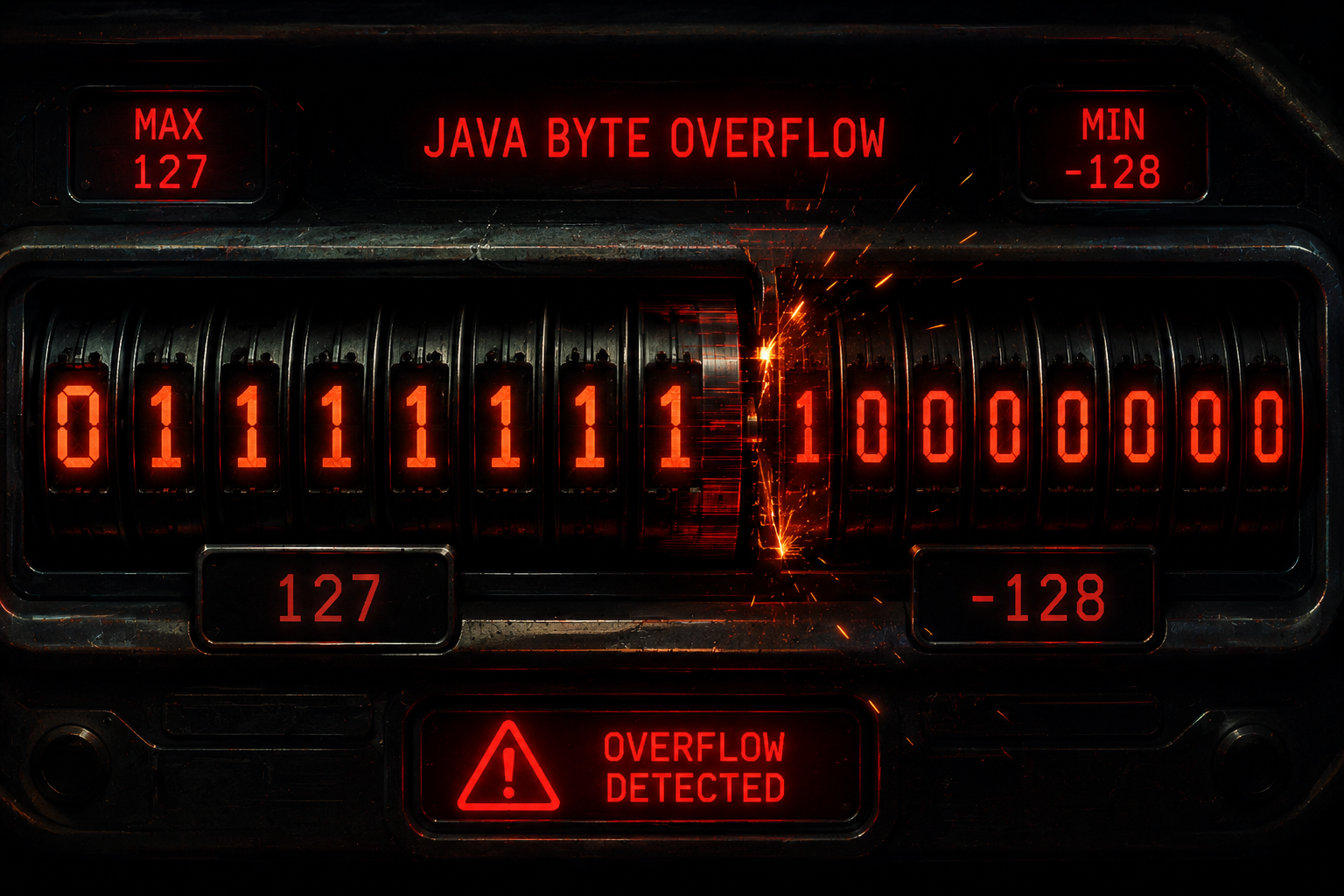
Because primitives have strict bit-width boundaries, they behave like an odometer on a car. If you take a byte at its maximum limit (127, binary 01111111) and use a compound assignment like b += 1, the binary math forces the bits to roll over to 10000000 .
As we learned from Two's Complement ( don't worry, it's discussed in depth in the next post ), an MSB of 1 signifies a negative number. That simple addition instantly warps the value to -128. Java will not warn you when this happens; it silently rolls over the cliff into an overflow (or drops below the minimum floor into an underflow).
The same thing happens in reverse at the bottom of the range. Take a byte at its minimum limit (-128, binary 10000000) and subtract 1 with b -= 1: the binary math forces the bits to roll under to 01111111. With an MSB of 0, that pattern now reads as a positive number — specifically 127. The value has dropped below the minimum floor and wrapped all the way around to the maximum, an underflow.
Important caveat: In Java, arithmetic on byte values promotes to int. The code byte b = 127; byte c = b + 1; will fail to compile due to possible lossy conversion. Silent overflow only occurs with compound assignment (b += 1;) or increment (b++;), not with ordinary addition assigned back to a byte.
int and long, even though the primitive types themselves remain signed."No Way, That's Why!" 🤯
The Signed Design Choice: They removed unsigned types to save us from ourselves—James Gosling explicitly stripped them after watching C++ developers shoot themselves in the foot with mixed signed/unsigned arithmetic, which is a massive source of security vulnerabilities and bugs. But it leaves us blind when parsing raw unsigned binary streams from native C libraries.
"Wow, That's Stupid" 🤬
The Silent Roll: When using compound assignment or increment operators on a byte, Java allows 127 + 1 to silently wrap to -128 without throwing a single runtime exception or compiler warning. One tiny iteration too far, and your positive balances turn into catastrophic debt.
🛫 Pre-Flight Check
Look, I know we just speed-ran through a massive amount of concepts here without stopping to unpack every single detail. Don't worry about that. Consider this the pre-flight safety briefing.
Now that the wheels are off the ground... buckle up. We're picking up the pace. Next post will be on how Java stores negative and floating-point numbers!
Just a guy who can't sleep with an itch — notes from Scratch.
— Kaustubh


